
Building a Production-Ready Go Web Service -- Project 1 (Part 1)
Series: DevOps Project Series
Part: 1 of 3
GitHub Repo: https://github.com/khatri11-cloud/go-devops-platform\
Introduction
As part of my journey toward becoming a DevOps Engineer, I wanted to move beyond tutorials and build projects that reflect real engineering practices. Rather than deploying a simple “Hello World” application, I decided to create a small Go web service that could eventually be containerized and deployed to the cloud using Infrastructure as Code.
This project is the first part of a larger DevOps series where I will gradually build a complete deployment pipeline using Docker, Terraform, and Microsoft Azure.
The goal of this article is to explain how I designed and built the application itself before worrying about containers or cloud infrastructure.
Why Go?
I chose Go for several reasons.
First, Go has become one of the most popular programming languages in cloud-native computing. Many modern DevOps tools including Docker, Kubernetes, Prometheus, and Terraform are written in Go. Learning the language helps me understand not only application development but also the tools used throughout the DevOps ecosystem.
Second, Go produces a single statically compiled binary. This makes deployment extremely simple because there are no runtime dependencies to install on the target machine.
Finally, Go provides excellent concurrency support and a lightweight standard library that is sufficient for building production-ready HTTP services without requiring large external frameworks.
Project Goals
Before writing any code, I defined a few realistic goals for the application.
Instead of focusing on features, I focused on operational characteristics that are important in production.
The application should:
- expose an HTTP server
- provide a health endpoint
- expose application version information
- support environment variables
- shut down gracefully
- be easy to containerize
- be suitable for cloud deployment
Although the application itself is intentionally simple, these characteristics mirror what many production microservices provide.
Designing the Project Structure
Rather than placing everything inside a single file, I organized the project into separate packages.
The directory structure looks like this:
app/
├── cmd/
│   └── server/
├── internal/
│   ├── config/
│   └── handlers/
├── Dockerfile
├── go.mod
└── Makefile
This layout separates application startup logic from business logic and configuration.
Keeping responsibilities separated makes the project easier to maintain as it grows.
Building the HTTP Server
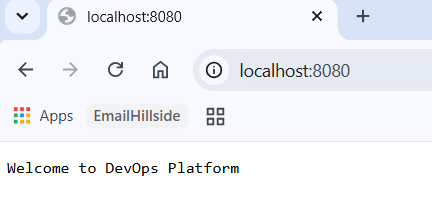
The application exposes three endpoints.
Home Endpoint
The root endpoint simply confirms that the application is running.
GET /
This endpoint is useful for quickly verifying that the application is accessible.
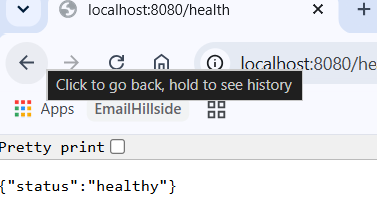
Health Endpoint
GET /health
Health endpoints are commonly used by load balancers, container orchestrators, and monitoring systems to determine whether an application is healthy.
Although my current implementation simply returns a successful response, this endpoint could later include database connectivity checks or external service health.
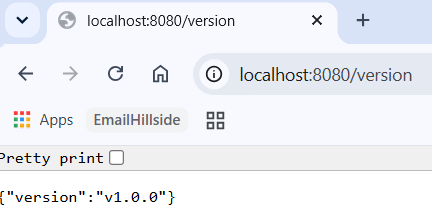
Version Endpoint
GET /version
The version endpoint exposes the running application version.
In production environments, knowing exactly which version is deployed helps with debugging, rollbacks, and deployment verification.
Later in this project series, I plan to extend this endpoint to include Git commit hashes and build timestamps.
 {width=“3.600311679790026in”
height=“1.7251498250218722in”}
{width=“3.600311679790026in”
height=“1.7251498250218722in”}
 {width=“3.141938976377953in”
height=“1.6418088363954506in”}
{width=“3.141938976377953in”
height=“1.6418088363954506in”}
 {width=“3.600311679790026in”
height=“1.766819772528434in”}
{width=“3.600311679790026in”
height=“1.766819772528434in”}
Configuration Using Environment Variables
Instead of hardcoding configuration values, I used environment variables wherever possible.
This follows the principles described in the Twelve-Factor App methodology.
Separating configuration from code makes it possible to run the same application binary across development, testing, and production environments simply by changing environment variables.
This becomes especially important once the application is deployed inside containers.
Implementing Graceful Shutdown
One feature I specifically wanted to implement was graceful shutdown.
When an application receives an interrupt signal, it should not terminate immediately.
Instead, it should:
- stop accepting new requests
- finish processing existing requests
- release resources
- exit cleanly
Go’s standard HTTP server provides built-in support for graceful shutdown, making this relatively straightforward to implement.
Testing this locally showed the server shutting down without abruptly terminating active connections.
{width=“6.5in” height=“0.6423611111111112in”}
Testing the Application
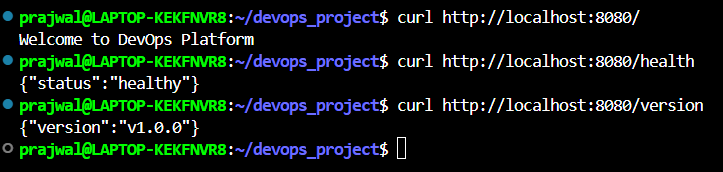
Before thinking about Docker or cloud deployment, I verified that everything worked locally.
I tested every endpoint using both a browser and curl.
curl http://localhost:8080/
curl http://localhost:8080/health
curl http://localhost:8080/version
Verifying the application locally first made debugging significantly easier before introducing additional layers like containers or cloud infrastructure.
 {width=“6.025521653543307in”
height=“1.4334580052493437in”}
{width=“6.025521653543307in”
height=“1.4334580052493437in”}
Lessons Learned
Although this application is intentionally small, I learned several important engineering concepts while building it.
The biggest lesson was that production readiness is not determined by the number of features an application provides.
Instead, operational concerns such as health checks, configuration management, graceful shutdown, and maintainable project organization play an equally important role.
I also gained a better appreciation for Go’s simplicity. The standard library provides everything necessary to build a robust HTTP service without relying heavily on external dependencies.
Finally, designing the application with deployment in mind from the beginning made the later Docker and Terraform phases much easier.
What’s Next?
With the application complete, the next step is to package it inside a Docker container.
In the next article, I will explain how I used a multi-stage Docker build to create a small production-ready image and prepare the application for cloud deployment.
Repository
GitHub Repository:
https://github.com/khatri11-cloud/devops_project
References
- Go Documentation
- Docker Documentation
- Microsoft Azure Documentation
Thank you for reading.
If you have suggestions or feedback, feel free to connect with me on LinkedIn. This project is part of my public learning journey toward becoming a DevOps Engineer, and I’ll continue documenting each stage as I build more complex cloud-native projects.